Getting Started
Installation
1. Install Asymptote
Geolet uses Asymptote as its rendering backend. Install it first:
Verify the installation:
2. Install Geolet
Or with uv:
Your First Figure
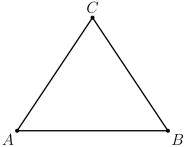
Create a file called triangle.py:
"""Getting started triangle example."""

from geolet import autofigure, point, segment


@autofigure
def getting_started_triangle():
    # Create three points
    A = point(0, 0, "A", label_dir="SW")
    B = point(4, 0, "B", label_dir="SE")
    C = point(2, 3, "C", label_dir="N")

    # Connect them with segments
    ab = segment(A, B)
    bc = segment(B, C)
    ca = segment(C, A)
Generate the output:
# Generate Asymptote source
geolet generate triangle.py

# Generate PDF directly
geolet generate triangle.py -f pdf

# Generate SVG
geolet generate triangle.py -f svg
Understanding Decorators
Geolet provides two decorators for creating figures:
@autofigure - Automatic Collection
The @autofigure decorator automatically collects all Drawable objects created in the function. No return statement needed.
@autofigure
def my_figure():
    A = point(0, 0, "A")
    B = point(1, 0, "B")
    segment(A, B)  # Automatically included
@figure - Explicit Return
The @figure decorator requires you to explicitly return a list of drawables:
@figure
def my_figure():
    A = point(0, 0, "A")
    B = point(1, 0, "B")
    seg = segment(A, B)

    return [A, B, seg]
Use @figure when you need more control over what gets drawn.
Next Steps
- Browse the API Reference for all available functions
- Check out the Examples Gallery for inspiration