Triangle
The triangle() function creates a helper that groups three points and provides convenient access to sides and triangle centers.
triangle function
def triangle(
    p1: Point,
    p2: Point,
    p3: Point,
    *,
    color: str = "black",
    style: str = "solid",
    width: float = 1.0,
) -> Triangle
Create a triangle from three vertices.
Triangle is a helper class that groups three points and provides convenient access to sides and triangle centers. It is NOT a primitive type - instead it creates segments and points as needed.
Example
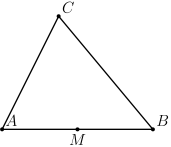
"""Simple triangle example using the triangle function."""

from geolet import autofigure, midpoint, point
from geolet import triangle as make_triangle


@autofigure
def triangle():
    A = point(0, 0, "A")
    B = point(4, 0, "B")
    C = point(1.5, 3, "C")

    # triangle() automatically draws all three sides
    T = make_triangle(A, B, C)

    # Midpoint of AB
    M = midpoint(A, B, "M", label_dir="S")
Properties
Vertices
| Property | Description |
|---|---|
p1, p2, p3 |
The three vertices |
Sides
| Property | Description |
|---|---|
side12 |
Side from p1 to p2 |
side23 |
Side from p2 to p3 |
side31 |
Side from p3 to p1 |
sides |
Tuple of all three sides (side12, side23, side31) |
Methods
centroid
Get the centroid (center of mass) of the triangle.
orthocenter
Get the orthocenter (intersection of altitudes) of the triangle.
circumcenter
Get the circumcenter (center of circumcircle) of the triangle.
incenter
Get the incenter (center of incircle) of the triangle.
circumcircle
def circumcircle(
    self,
    *,
    label: str = "",
    color: str = "black",
    style: str = "solid",
    width: float = 1.0,
) -> Circle
Get the circumcircle of the triangle.
incircle
def incircle(
    self,
    *,
    label: str = "",
    color: str = "black",
    style: str = "solid",
    width: float = 1.0,
) -> Circle
Get the incircle of the triangle.
primitives
Get all primitives for rendering (vertices and sides).
Example
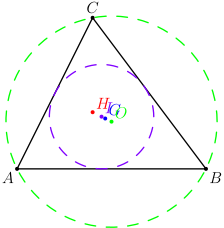
"""Triangle accessors - vertices, sides, and centers."""

from geolet import autofigure, point, triangle


@autofigure
def triangle_accessors():
    A = point(0, 0, "A", label_dir="SW")
    B = point(5, 0, "B", label_dir="SE")
    C = point(2, 4, "C", label_dir="N")

    T = triangle(A, B, C)

    # Access vertices: T.p1, T.p2, T.p3
    # Access sides: T.side12, T.side23, T.side31

    # Triangle centers
    G = T.centroid("G", color="blue")
    H = T.orthocenter("H", color="red")
    O = T.circumcenter("O", color="green")
    I = T.incenter("I", color="purple")

    # Circles
    circ = T.circumcircle(color="green", style="dashed")
    inc = T.incircle(color="purple", style="dashed")
Factory Functions
Geolet provides factory functions for common triangle types with sensible default vertices.
acute_triangle
def acute_triangle(
    p1: Point = ...,
    p2: Point = ...,
    p3: Point = ...,
    *,
    color: str = "black",
    style: str = "solid",
    width: float = 1.0,
) -> Triangle
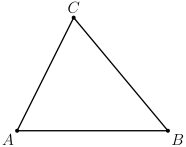
Create an acute triangle. Default vertices: A(0,0), B(4,0), C(1.5,3)
Example
"""Acute triangle with default vertices."""

from geolet import acute_triangle, autofigure


@autofigure
def acute_triangle_():
    T = acute_triangle()
right_triangle
def right_triangle(
    p1: Point = ...,
    p2: Point = ...,
    p3: Point = ...,
    *,
    color: str = "black",
    style: str = "solid",
    width: float = 1.0,
) -> Triangle
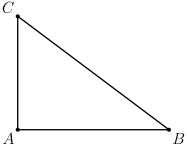
Create a right triangle. Default vertices: A(0,0), B(4,0), C(0,3) with right angle at A.
Example
"""Right triangle with default vertices."""

from geolet import autofigure, right_triangle


@autofigure
def right_triangle_():
    T = right_triangle()
obtuse_triangle
def obtuse_triangle(
    p1: Point = ...,
    p2: Point = ...,
    p3: Point = ...,
    *,
    color: str = "black",
    style: str = "solid",
    width: float = 1.0,
) -> Triangle
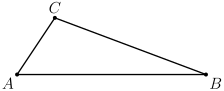
Create an obtuse triangle. Default vertices: A(0,0), B(5,0), C(1,1.5) with obtuse angle at C.
Example
"""Obtuse triangle with default vertices."""

from geolet import autofigure, obtuse_triangle


@autofigure
def obtuse_triangle_():
    T = obtuse_triangle()
isosceles_right_triangle
def isosceles_right_triangle(
    p1: Point = ...,
    p2: Point = ...,
    p3: Point = ...,
    *,
    color: str = "black",
    style: str = "solid",
    width: float = 1.0,
) -> Triangle
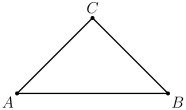
Create an isosceles right triangle. Default vertices: A(0,0), B(4,0), C(2,2)
Example
"""Isosceles right triangle with default vertices."""

from geolet import autofigure, isosceles_right_triangle


@autofigure
def isosceles_right_triangle_():
    T = isosceles_right_triangle()
isosceles_acute_triangle
def isosceles_acute_triangle(
    p1: Point = ...,
    p2: Point = ...,
    p3: Point = ...,
    *,
    color: str = "black",
    style: str = "solid",
    width: float = 1.0,
) -> Triangle
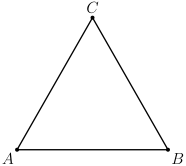
Create an isosceles acute triangle. Default vertices: A(0,0), B(4,0), C(2,3.5)
Example
"""Isosceles acute triangle with default vertices."""

from geolet import autofigure, isosceles_acute_triangle


@autofigure
def isosceles_acute_triangle_():
    T = isosceles_acute_triangle()
isosceles_obtuse_triangle
def isosceles_obtuse_triangle(
    p1: Point = ...,
    p2: Point = ...,
    p3: Point = ...,
    *,
    color: str = "black",
    style: str = "solid",
    width: float = 1.0,
) -> Triangle
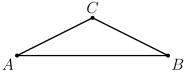
Create an isosceles obtuse triangle. Default vertices: A(0,0), B(4,0), C(2,1)
Example
"""Isosceles obtuse triangle with default vertices."""

from geolet import autofigure, isosceles_obtuse_triangle


@autofigure
def isosceles_obtuse_triangle_():
    T = isosceles_obtuse_triangle()
Using triangle with @autofigure
When using @autofigure, a Triangle automatically expands to include all its vertices and sides:
from geolet import autofigure, point, triangle

@autofigure
def my_triangle():
    A = point(0, 0, "A")
    B = point(4, 0, "B")
    C = point(2, 3, "C")

    # triangle() draws all three vertices and sides
    T = triangle(A, B, C)

    # Access centers via methods
    G = T.centroid(label="G", color="blue")
    O = T.circumcircle(color="red")