Reflections
Reflect points over other points, segments, or lines.
reflect
def reflect(
    pt: Point,
    over: Point | Line | Segment,
    label: str = "",
    *,
    label_dir: str = "NE",
    color: str = "black",
) -> Point
Create a reflection of a point.
Parameters:
| Name | Type | Default | Description |
|---|---|---|---|
pt |
Point |
required | Point to reflect |
over |
Point \| Line \| Segment |
required | Point, line, or segment to reflect over |
label |
str |
"" |
Display label (empty for hidden point) |
label_dir |
str |
"NE" |
Direction for label placement |
color |
str |
"black" |
Color for the point |
Returns: A Point with Reflection construction.
Reflection Types
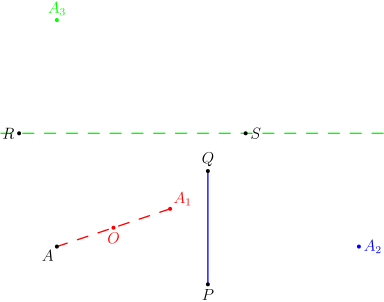
- Over a point: The result is the point such that the mirror point is the midpoint of the original and reflected points.
- Over a line/segment: The result is the mirror image across the line.
Example
"""Reflect example - point reflection over point, segment, and line."""

from geolet import autofigure, line, point, reflect, segment


@autofigure
def reflect_():
    A = point(1, 1, "A", label_dir="SW")

    # Reflect over a point
    O = point(2.5, 1.5, "O", label_dir="S", color="red")
    A_1 = reflect(A, O, label="A_1", label_dir="NE", color="red")

    # Reflect over a segment
    P = point(5, 0, "P", label_dir="S")
    Q = point(5, 3, "Q", label_dir="N")
    pq = segment(P, Q, color="blue")
    A_2 = reflect(A, pq, label="A_2", label_dir="E", color="blue")

    # Reflect over a line
    R = point(0, 4, "R", label_dir="W")
    S = point(6, 4, "S", label_dir="E")
    rs = line(R, S, color="green", style="dashed")
    A_3 = reflect(A, rs, label="A_3", label_dir="N", color="green")

    seg_A_A1 = segment(A, A_1, color="red", style="dashed")