Inversions
Circle inversion transformations.
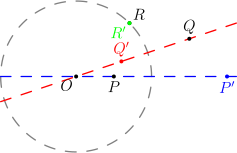
Circle inversion is a transformation that maps points inside a circle to points outside (and vice versa). Points on the circle of inversion map to themselves.
invert
def invert(
    pt: Point,
    circle: Circle,
    label: str = "",
    *,
    label_dir: str = "NE",
    color: str = "black",
) -> Point
Create the inversion of a point with respect to a circle.
Parameters:
| Name | Type | Default | Description |
|---|---|---|---|
pt |
Point |
required | Point to invert |
circle |
Circle |
required | Circle of inversion |
label |
str |
"" |
Display label (empty for hidden point) |
label_dir |
str |
"NE" |
Direction for label placement |
color |
str |
"black" |
Color for the point |
Returns: A Point with InvertedPoint construction.
Example
"""InvertPoint example - inverting points with respect to a circle."""

from math import sqrt

from geolet import autofigure, circle, invert, line, point


@autofigure
def invert_point():
    # Circle of inversion centered at O with radius 2
    O = point(0, 0, "O", label_dir="SW")
    inv_circle = circle(O, 2, color="gray", style="dashed")

    # Points to invert
    # P is inside the circle (distance 1 from center), on horizontal axis
    P = point(1, 0, "P", label_dir="S")
    # Q is outside the circle, to the right
    Q = point(3, 1, "Q", label_dir="N")
    # R is on the circle (distance 2 from center) on the diagonal - maps to itself
    R = point(sqrt(2), sqrt(2), "R", label_dir="NE")

    # Invert the points
    # P at distance 1 maps to P' at distance 4 (1 * 4 = 2^2 = 4)
    P_inv = invert(P, inv_circle, "P'", label_dir="S", color="blue")
    # Q at distance sqrt(10) maps to Q' at distance 4/sqrt(10)
    Q_inv = invert(Q, inv_circle, "Q'", label_dir="N", color="red")
    # R on the circle maps to itself
    R_inv = invert(R, inv_circle, "R'", label_dir="SW", color="green")

    # Draw lines through O connecting original points to their inversions
    line1 = line(P, P_inv, color="blue", style="dashed")
    line2 = line(Q, Q_inv, color="red", style="dashed")
invert_line
def invert_line(
    line: Line,
    inversion_circle: Circle,
    *,
    label: str = "",
    label_dir: str = "NE",
    label_pos: float = 0.0,
    color: str = "black",
    style: str = "solid",
    width: float = 1.0,
) -> Circle
Invert a line with respect to a circle.
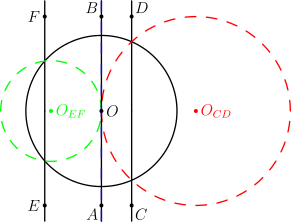
When a line does not pass through the center of inversion, it inverts to a circle that passes through the center.
Parameters:
| Name | Type | Default | Description |
|---|---|---|---|
line |
Line |
required | Line to invert (should not pass through center of inversion) |
inversion_circle |
Circle |
required | Circle of inversion |
label |
str |
"" |
Display label |
label_dir |
str |
"NE" |
Direction for label placement |
label_pos |
float |
0.0 |
Position along circle for label |
color |
str |
"black" |
Color for the resulting circle |
style |
str |
"solid" |
Line style (solid, dashed, dotted) |
width |
float |
1.0 |
Line width |
Returns: A Circle with InvertedLine construction.
See the invert_line example below.
invert_line_through_center
def invert_line_through_center(
    line: Line,
    inversion_circle: Circle,
    *,
    label: str = "",
    label_dir: str = "NE",
    label_pos: float = 0.5,
    color: str = "black",
    style: str = "solid",
    width: float = 1.0,
) -> Line
Invert a line that passes through the center of inversion.
When a line passes through the center of inversion, it maps to itself.
Parameters:
| Name | Type | Default | Description |
|---|---|---|---|
line |
Line |
required | Line to invert (must pass through center of inversion) |
inversion_circle |
Circle |
required | Circle of inversion |
label |
str |
"" |
Display label |
label_dir |
str |
"NE" |
Direction for label placement |
label_pos |
float |
0.5 |
Position along line for label |
color |
str |
"black" |
Color for the resulting line |
style |
str |
"solid" |
Line style (solid, dashed, dotted) |
width |
float |
1.0 |
Line width |
Returns: The same line (lines through center map to themselves).
See the invert_line example below.
Example: Invert Line
"""InvertLine example - inverting lines with respect to a circle."""

from geolet import (
    autofigure,
    circle,
    invert_line,
    invert_line_through_center,
    inverted_line_center,
    line,
    point,
)


@autofigure
def invert_line_():
    # Circle of inversion centered at O with radius 2
    O = point(0, 0, "O", label_dir="E")
    inv_circle = circle(O, 2)

    # Case 1: A line that doesn't pass through the center (x = 0.8)
    C = point(0.8, -2.5, "C", label_dir="SE")
    D = point(0.8, 2.5, "D", label_dir="NE")
    line_cd = line(C, D)

    # Invert the line - produces a circle passing through O
    inverted_circle_1 = invert_line(line_cd, inv_circle, color="red", style="dashed")
    O_CD = inverted_line_center(
        line_cd, inv_circle, "O_{CD}", label_dir="E", color="red"
    )

    # Case 2: A line closer to the edge (x = -1.5) - produces a larger circle
    E = point(-1.5, -2.5, "E", label_dir="W")
    F = point(-1.5, 2.5, "F", label_dir="W")
    line_ef = line(E, F)

    inverted_circle_2 = invert_line(line_ef, inv_circle, color="green", style="dashed")
    O_EF = inverted_line_center(
        line_ef, inv_circle, "O_{EF}", label_dir="E", color="green"
    )

    # Case 3: A line through the center (x = 0) maps to itself
    A = point(0, -2.5, "A", label_dir="SW")
    B = point(0, 2.5, "B", label_dir="NW")
    line_through_center = line(A, B)

    # Invert the line through center - stays the same line (dashed to show inversion)
    inverted_same = invert_line_through_center(
        line_through_center, inv_circle, color="blue", style="dashed"
    )
invert_circle
def invert_circle(
    circle: Circle,
    inversion_circle: Circle,
    *,
    label: str = "",
    label_dir: str = "NE",
    label_pos: float = 0.0,
    color: str = "black",
    style: str = "solid",
    width: float = 1.0,
) -> Circle
Invert a circle with respect to another circle.
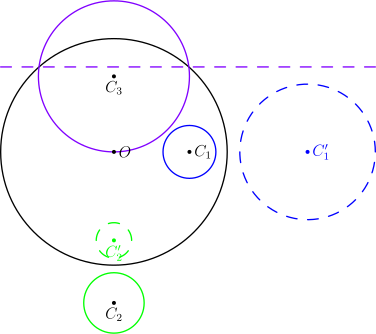
When a circle does not pass through the center of inversion, it inverts to another circle.
Parameters:
| Name | Type | Default | Description |
|---|---|---|---|
circle |
Circle |
required | Circle to invert |
inversion_circle |
Circle |
required | Circle of inversion |
label |
str |
"" |
Display label |
label_dir |
str |
"NE" |
Direction for label placement |
label_pos |
float |
0.0 |
Position along circle for label |
color |
str |
"black" |
Color for the resulting circle |
style |
str |
"solid" |
Line style (solid, dashed, dotted) |
width |
float |
1.0 |
Line width |
Returns: A Circle with InvertedCircle construction.
invert_circle_through_center
def invert_circle_through_center(
    circle: Circle,
    inversion_circle: Circle,
    *,
    label: str = "",
    label_dir: str = "NE",
    label_pos: float = 0.5,
    color: str = "black",
    style: str = "solid",
    width: float = 1.0,
) -> Line
Invert a circle that passes through the center of inversion.
When a circle passes through the center of inversion, it inverts to a line.
Parameters:
| Name | Type | Default | Description |
|---|---|---|---|
circle |
Circle |
required | Circle to invert (must pass through center of inversion) |
inversion_circle |
Circle |
required | Circle of inversion |
label |
str |
"" |
Display label |
label_dir |
str |
"NE" |
Direction for label placement |
label_pos |
float |
0.5 |
Position along line for label |
color |
str |
"black" |
Color for the resulting line |
style |
str |
"solid" |
Line style (solid, dashed, dotted) |
width |
float |
1.0 |
Line width |
Returns: A Line with InvertedCircle construction.
Example: Invert Circle
"""InvertCircle example - inverting circles with respect to another circle."""

from geolet import (
    autofigure,
    circle,
    invert_circle,
    invert_circle_through_center,
    inverted_circle_center,
    point,
)


@autofigure
def invert_circle_():
    # Circle of inversion centered at O with radius 3
    O = point(0, 0, "O", label_dir="E")
    inv_circle = circle(O, 3)

    # Case 1: A circle that doesn't pass through the center of inversion
    # This circle centered at (2, 0) with radius 0.5 will invert to another circle
    C1 = point(2, 0, "C_1", label_dir="E")
    circle1 = circle(C1, 0.7, color="blue")
    circle1_inv = invert_circle(circle1, inv_circle, color="blue", style="dashed")
    C1_prime = inverted_circle_center(
        circle1, inv_circle, "C'_1", label_dir="E", color="blue"
    )

    # Case 2: Another circle further from center
    C2 = point(0, -4, "C_2", label_dir="S")
    circle2 = circle(C2, 0.8, color="green")
    circle2_inv = invert_circle(circle2, inv_circle, color="green", style="dashed")
    C2_prime = inverted_circle_center(
        circle2, inv_circle, "C'_2", label_dir="S", color="green"
    )

    # Case 3: A circle passing through the center of inversion maps to a line
    C3 = point(0, 2, "C_3", label_dir="S")
    circle3 = circle(C3, 2, color="purple")  # passes through O
    circle3_inv = invert_circle_through_center(
        circle3, inv_circle, color="purple", style="dashed"
    )
inverted_line_center
def inverted_line_center(
    line: Line,
    inversion_circle: Circle,
    label: str = "",
    *,
    label_dir: str = "NE",
    color: str = "black",
) -> Point
Create the center point of an inverted line's circle.
When a line is inverted with respect to a circle (and doesn't pass through the center), it produces a circle. This function returns the center of that resulting circle.
Parameters:
| Name | Type | Default | Description |
|---|---|---|---|
line |
Line |
required | The line being inverted |
inversion_circle |
Circle |
required | The circle of inversion |
label |
str |
"" |
Display label (empty for hidden point) |
label_dir |
str |
"NE" |
Direction for label placement |
color |
str |
"black" |
Color for the point |
Returns: A Point with InvertedLineCenter construction.
inverted_circle_center
def inverted_circle_center(
    circle: Circle,
    inversion_circle: Circle,
    label: str = "",
    *,
    label_dir: str = "NE",
    color: str = "black",
) -> Point
Create the center point of an inverted circle's result.
When a circle is inverted with respect to another circle (and doesn't pass through the center), it produces another circle. This function returns the center of that resulting circle.
Parameters:
| Name | Type | Default | Description |
|---|---|---|---|
circle |
Circle |
required | The circle being inverted |
inversion_circle |
Circle |
required | The circle of inversion |
label |
str |
"" |
Display label (empty for hidden point) |
label_dir |
str |
"NE" |
Direction for label placement |
color |
str |
"black" |
Color for the point |
Returns: A Point with InvertedCircleCenter construction.
Inversion Properties
| Original Object | Passes Through Center? | Result |
|---|---|---|
| Point | N/A | Point |
| Line | No | Circle through center |
| Line | Yes | Same line |
| Circle | No | Circle |
| Circle | Yes | Line |