Circles
Circle primitives for creating circles in various ways.
circle
def circle(
    center: Point,
    radius: float,
    *,
    label: str = "",
    label_dir: str = "NE",
    label_pos: float = 0.0,
    color: str = "black",
    style: str = "solid",
    width: float = 1.0,
) -> Circle
Create a circle with explicit center and radius.
Parameters:
| Name | Type | Default | Description |
|---|---|---|---|
center |
Point |
required | Center point |
radius |
float |
required | Radius value |
label |
str |
"" |
Display label |
label_dir |
str |
"NE" |
Direction for label placement (N, NE, E, SE, S, SW, W, NW) |
label_pos |
float |
0.0 |
Position along circle for label (0.0 to 1.0) |
color |
str |
"black" |
Color for the circle |
style |
str |
"solid" |
Line style (solid, dashed, dotted) |
width |
float |
1.0 |
Line width |
Returns: A Circle with CenterRadius construction.
Example
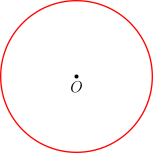
"""Circle with radius example."""

from geolet import autofigure, circle, point


@autofigure
def circle_radius():
    O = point(0, 0, "O", label_dir="S")

    c = circle(O, 2.0, color="red")
circle_through
def circle_through(
    center: Point,
    through: Point,
    *,
    label: str = "",
    label_dir: str = "NE",
    label_pos: float = 0.0,
    color: str = "black",
    style: str = "solid",
    width: float = 1.0,
) -> Circle
Create a circle with center passing through a point.
Parameters:
| Name | Type | Default | Description |
|---|---|---|---|
center |
Point |
required | Center point |
through |
Point |
required | Point on the circle |
label |
str |
"" |
Display label |
label_dir |
str |
"NE" |
Direction for label placement (N, NE, E, SE, S, SW, W, NW) |
label_pos |
float |
0.0 |
Position along circle for label (0.0 to 1.0) |
color |
str |
"black" |
Color for the circle |
style |
str |
"solid" |
Line style (solid, dashed, dotted) |
width |
float |
1.0 |
Line width |
Returns: A Circle with CenterThrough construction.
Example
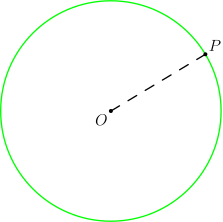
"""Circle through point example."""

from geolet import autofigure, circle_through, point, segment


@autofigure
def circle_through_():
    O = point(0, 0, "O", label_dir="SW")
    P = point(2.5, 1.5, "P", label_dir="NE")

    seg_OP = segment(O, P, style="dashed")
    circ = circle_through(O, P, color="green")
circumcircle
def circumcircle(
    p1: Point,
    p2: Point,
    p3: Point,
    *,
    label: str = "",
    label_dir: str = "NE",
    label_pos: float = 0.0,
    color: str = "black",
    style: str = "solid",
    width: float = 1.0,
) -> Circle
Create the circumcircle of three points (the circle passing through all three).
Parameters:
| Name | Type | Default | Description |
|---|---|---|---|
p1 |
Point |
required | First point |
p2 |
Point |
required | Second point |
p3 |
Point |
required | Third point |
label |
str |
"" |
Display label |
label_dir |
str |
"NE" |
Direction for label placement (N, NE, E, SE, S, SW, W, NW) |
label_pos |
float |
0.0 |
Position along circle for label (0.0 to 1.0) |
color |
str |
"black" |
Color for the circle |
style |
str |
"solid" |
Line style (solid, dashed, dotted) |
width |
float |
1.0 |
Line width |
Returns: A Circle with Through3Points construction.
Example
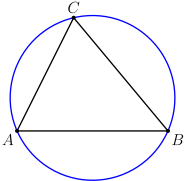
"""Circumcircle example."""

from geolet import autofigure, circumcircle, point, segment


@autofigure
def circumcircle_():
    A = point(0, 0, "A", label_dir="SW")
    B = point(4, 0, "B", label_dir="SE")
    C = point(1.5, 3, "C", label_dir="N")

    seg_AB = segment(A, B)
    seg_BC = segment(B, C)
    seg_CA = segment(C, A)
    circ = circumcircle(A, B, C, color="blue")
incircle
def incircle(
    p1: Point,
    p2: Point,
    p3: Point,
    *,
    label: str = "",
    label_dir: str = "NE",
    label_pos: float = 0.0,
    color: str = "black",
    style: str = "solid",
    width: float = 1.0,
) -> Circle
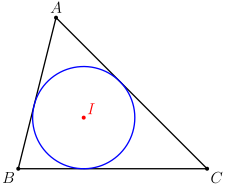
Create the incircle of a triangle (the inscribed circle tangent to all three sides).
Parameters:
| Name | Type | Default | Description |
|---|---|---|---|
p1 |
Point |
required | First vertex |
p2 |
Point |
required | Second vertex |
p3 |
Point |
required | Third vertex |
label |
str |
"" |
Display label |
label_dir |
str |
"NE" |
Direction for label placement (N, NE, E, SE, S, SW, W, NW) |
label_pos |
float |
0.0 |
Position along circle for label (0.0 to 1.0) |
color |
str |
"black" |
Color for the circle |
style |
str |
"solid" |
Line style (solid, dashed, dotted) |
width |
float |
1.0 |
Line width |
Returns: A Circle with Incircle construction.
Example
"""Incenter example - intersection of angle bisectors."""

from geolet import autofigure, incenter, incircle, point, segment


@autofigure
def incenter_():
    A = point(1, 4, "A", label_dir="N")
    B = point(0, 0, "B", label_dir="SW")
    C = point(5, 0, "C", label_dir="SE")

    seg_AB = segment(A, B)
    seg_BC = segment(B, C)
    seg_CA = segment(C, A)
    circ = incircle(A, B, C, color="blue")
    I = incenter(A, B, C, "I", color="red")
tangent
def tangent(
    circle: Circle,
    through: Point,
    *,
    index: int = 0,
    label: str = "",
    label_dir: str = "NE",
    label_pos: float = 0.5,
    color: str = "black",
    style: str = "solid",
    width: float = 1.0,
) -> Line
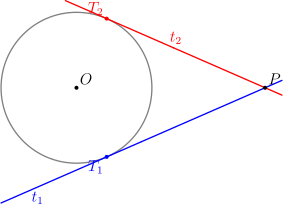
Create a tangent line from an external point to a circle.
When a point is outside a circle, there are two tangent lines from that point to the circle. Use index=0 for the first tangent and index=1 for the second.
Parameters:
| Name | Type | Default | Description |
|---|---|---|---|
circle |
Circle |
required | The circle to draw tangent to |
through |
Point |
required | External point the tangent passes through |
index |
int |
0 |
Which tangent line (0 or 1) |
label |
str |
"" |
Display label |
label_dir |
str |
"NE" |
Direction for label placement (N, NE, E, SE, S, SW, W, NW) |
label_pos |
float |
0.5 |
Position along line for label (0.0 to 1.0) |
color |
str |
"black" |
Color for the line |
style |
str |
"solid" |
Line style (solid, dashed, dotted) |
width |
float |
1.0 |
Line width |
Returns: A Line with TangentTo construction.
Example
"""Tangent example - drawing tangent lines from external point to circle."""

from geolet import autofigure, circle, point, segment, tangent, tangent_point


@autofigure
def tangent_():
    # Circle with center O and radius 2
    O = point(0, 0, "O")
    c = circle(O, 2, color="gray")

    # External point P
    P = point(5, 0, "P")

    # Two tangent lines from P to circle c
    t1 = tangent(c, P, index=0, label="t_1", label_dir="S", label_pos=0.0, color="blue")
    t2 = tangent(c, P, index=1, label="t_2", label_dir="N", label_pos=0.0, color="red")

    # Tangent points - where each tangent line touches the circle
    T1 = tangent_point(c, P, "T_1", index=0, label_dir="SW", color="blue")
    T2 = tangent_point(c, P, "T_2", index=1, label_dir="NW", color="red")

    # Segments from P to tangent points (these have equal length)
    segment(P, T1, style="dashed", color="blue")
    segment(P, T2, style="dashed", color="red")
tangent_point
def tangent_point(
    circle: Circle,
    through: Point,
    label: str = "",
    *,
    index: int = 0,
    label_dir: str = "NE",
    color: str = "black",
) -> Point
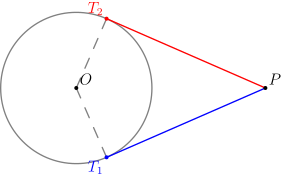
Create the point of tangency where a tangent line touches a circle.
When a point is outside a circle, there are two tangent lines from that point to the circle. Use index=0 for the first tangent point and index=1 for the second.
Parameters:
| Name | Type | Default | Description |
|---|---|---|---|
circle |
Circle |
required | The circle to find tangent point on |
through |
Point |
required | External point the tangent passes through |
label |
str |
"" |
Display label (empty for hidden point) |
index |
int |
0 |
Which tangent point (0 or 1) |
label_dir |
str |
"NE" |
Direction for label placement |
color |
str |
"black" |
Color for the point |
Returns: A Point with TangentPoint construction.
Example
"""TangentPoint example - finding where tangent lines touch a circle."""

from geolet import autofigure, circle, point, segment, tangent_point


@autofigure
def tangent_point_():
    # Circle with center O and radius 2
    O = point(0, 0, "O")
    c = circle(O, 2, color="gray")

    # External point P
    P = point(5, 0, "P")

    # Tangent points - where tangent lines from P touch the circle
    T1 = tangent_point(c, P, "T_1", index=0, label_dir="SW", color="blue")
    T2 = tangent_point(c, P, "T_2", index=1, label_dir="NW", color="red")

    # Segments from external point to tangent points
    # These segments have equal length (property of tangent lines)
    s1 = segment(P, T1, color="blue")
    s2 = segment(P, T2, color="red")

    # Segments from center to tangent points (radii, perpendicular to tangents)
    r1 = segment(O, T1, style="dashed", color="gray")
    r2 = segment(O, T2, style="dashed", color="gray")
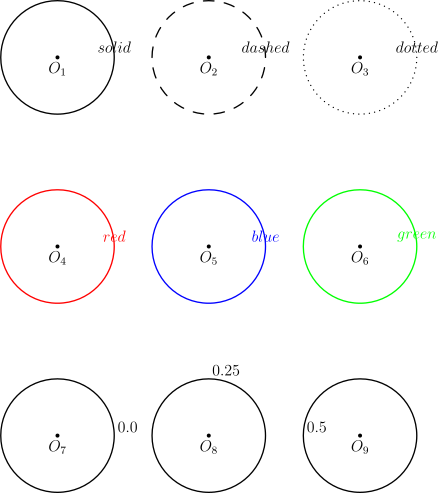
Styling
"""Circle styling options."""

from geolet import autofigure, circle, point


@autofigure
def circle_styles():
    # Row 1: Line styles
    O1 = point(0, 0, "O_1", label_dir="S")
    O2 = point(4, 0, "O_2", label_dir="S")
    O3 = point(8, 0, "O_3", label_dir="S")

    c1 = circle(O1, 1.5, label="solid", label_dir="N")
    c2 = circle(O2, 1.5, label="dashed", label_dir="N", style="dashed")
    c3 = circle(O3, 1.5, label="dotted", label_dir="N", style="dotted")

    # Row 2: Colors
    O4 = point(0, -5, "O_4", label_dir="S")
    O5 = point(4, -5, "O_5", label_dir="S")
    O6 = point(8, -5, "O_6", label_dir="S")

    c4 = circle(O4, 1.5, label="red", label_dir="N", color="red")
    c5 = circle(O5, 1.5, label="blue", label_dir="N", color="blue")
    c6 = circle(O6, 1.5, label="green", label_dir="N", color="green")

    # Row 3: Label positions (using label_pos 0.0 to 1.0)
    O7 = point(0, -10, "O_7", label_dir="S")
    O8 = point(4, -10, "O_8", label_dir="S")
    O9 = point(8, -10, "O_9", label_dir="S")

    c7 = circle(O7, 1.5, label="0.0", label_pos=0.0)
    c8 = circle(O8, 1.5, label="0.25", label_pos=0.25)
    c9 = circle(O9, 1.5, label="0.5", label_pos=0.5)