Angles
Angle marking for geometry diagrams.
angle
def angle(
    p1: Point,
    vertex: Point,
    p2: Point,
    *,
    label: str = "",
    color: str = "black",
    n: int = 1,
    radius: float = 0.4,
    fill: bool = False,
    fill_opacity: float = 0.3,
    right_angle: bool = False,
) -> Angle
Create an angle marking between three points.
The angle is at the vertex, measured from p1 to p2.
Parameters:
| Name | Type | Default | Description |
|---|---|---|---|
p1 |
Point |
required | First point (start of first ray) |
vertex |
Point |
required | Vertex point (where the angle is measured) |
p2 |
Point |
required | Third point (end of second ray) |
label |
str |
"" |
Display label (LaTeX supported, e.g., "\\alpha") |
color |
str |
"black" |
Color for the angle arc/marker |
n |
int |
1 |
Number of arcs (for congruent angle notation) |
radius |
float |
0.4 |
Radius of the angle arc in cm |
fill |
bool |
False |
Whether to fill the angle sector |
fill_opacity |
float |
0.3 |
Opacity of the fill (0.0 to 1.0) |
right_angle |
bool |
False |
Whether to draw a right angle marker instead of arc |
Returns: An Angle with ThreePoints construction.
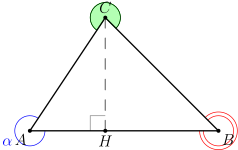
Example
"""Angle marking example."""

from geolet import angle, autofigure, foot, point, segment


@autofigure
def angle_():
    A = point(0, 0, "A", label_dir="SW")
    B = point(5, 0, "B", label_dir="SE")
    C = point(2, 3, "C", label_dir="N")
    H = foot(C, segment(A, B), label="H", label_dir="S")

    # Angle at A with label
    angle_A = angle(C, A, B, label=r"\alpha", color="blue")
    # Angle at B with 2 marks
    angle_B = angle(A, B, C, n=2, color="red")
    # Angle at C with fill
    angle_C = angle(B, C, A, fill=True, color="green")
    # Right angle at H
    right_angle = angle(A, H, C, right_angle=True, color="gray")

    seg_AB = segment(A, B)
    seg_BC = segment(B, C)
    seg_CA = segment(C, A)
    seg_CH = segment(C, H, color="gray", style="dashed")
Angle Types
The example above demonstrates all angle marking options:
- Labeled angle: Use
label=r"\alpha"for Greek letters - Multiple arcs: Use
n=2orn=3to mark congruent angles - Filled angle: Use
fill=Truefor shaded sectors - Right angle: Use
right_angle=Truefor the square marker
angle_bisector
def angle_bisector(
    p1: Point,
    vertex: Point,
    p2: Point,
    *,
    label: str = "",
    label_dir: str = "NE",
    label_pos: float = 0.5,
    color: str = "black",
    style: str = "solid",
    width: float = 1.0,
) -> Line
Create the angle bisector of angle p1-vertex-p2.
Parameters:
| Name | Type | Default | Description |
|---|---|---|---|
p1 |
Point |
required | First ray endpoint |
vertex |
Point |
required | Vertex of the angle |
p2 |
Point |
required | Second ray endpoint |
label |
str |
"" |
Display label |
label_dir |
str |
"NE" |
Direction for label placement (N, NE, E, SE, S, SW, W, NW) |
label_pos |
float |
0.5 |
Position along line for label (0.0 to 1.0) |
color |
str |
"black" |
Color for the line |
style |
str |
"solid" |
Line style (solid, dashed, dotted) |
width |
float |
1.0 |
Line width |
Returns: A Line with AngleBisector construction.
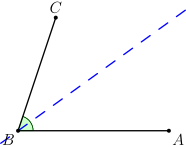
Example
"""Angle bisector example - line that bisects an angle."""

from geolet import angle, angle_bisector, autofigure, point, segment


@autofigure
def angle_bisector_():
    A = point(4, 0, "A", label_dir="SE")
    B = point(0, 0, "B", label_dir="SW")
    C = point(1, 3, "C", label_dir="N")

    seg_BA = segment(B, A)
    seg_BC = segment(B, C)

    bisector = angle_bisector(A, B, C, color="blue", style="dashed")
    ang = angle(A, B, C, color="green", fill=True, fill_opacity=0.2)
Styling
"""Angle styling options."""

from geolet import angle, autofigure, point, segment


@autofigure
def angle_styles():
    # First angle: default
    A1 = point(2, 0, "A_1", label_dir="SE")
    B1 = point(0, 0, "B_1", label_dir="SW")
    C1 = point(1, 1.5, "C_1", label_dir="N")
    s1 = segment(B1, A1)
    s2 = segment(B1, C1)
    ang1 = angle(A1, B1, C1)

    # Second angle: with label
    A2 = point(6, 0, "A_2", label_dir="SE")
    B2 = point(4, 0, "B_2", label_dir="SW")
    C2 = point(5, 1.5, "C_2", label_dir="N")
    s3 = segment(B2, A2)
    s4 = segment(B2, C2)
    ang2 = angle(A2, B2, C2, label=r"\alpha")

    # Third angle: multiple arcs (n=2)
    A3 = point(10, 0, "A_3", label_dir="SE")
    B3 = point(8, 0, "B_3", label_dir="SW")
    C3 = point(9, 1.5, "C_3", label_dir="N")
    s5 = segment(B3, A3)
    s6 = segment(B3, C3)
    ang3 = angle(A3, B3, C3, n=2, label=r"\beta", color="blue")

    # Fourth angle: filled
    A4 = point(14, 0, "A_4", label_dir="SE")
    B4 = point(12, 0, "B_4", label_dir="SW")
    C4 = point(13, 1.5, "C_4", label_dir="N")
    s7 = segment(B4, A4)
    s8 = segment(B4, C4)
    ang4 = angle(A4, B4, C4, fill=True, label=r"\gamma", color="green")

    # Fifth angle: right angle
    A5 = point(18, 0, "A_5", label_dir="SE")
    B5 = point(16, 0, "B_5", label_dir="SW")
    C5 = point(16, 1.5, "C_5", label_dir="N")
    s9 = segment(B5, A5)
    s10 = segment(B5, C5)
    ang5 = angle(A5, B5, C5, right_angle=True)
